Following is the Assembly language program for a real time clock
Code:
LCALL 061D
AGAIN MOV DPTR, #2845
REPEAT DEC82 ; Decrement DPL
MOVX A,@DPTR
MOV R3,A
MOV R5,#02
LCALL 059E
MOV A,20
LCALL 2006
MOVA,82
CJNE A,#42; REPEAT (ED)
MOVA,#OD ; OD = ASCII FOR ENTER
LCALL 2006
LJMP; AGAIN ( 6003 )
To change the RTC
2844-hrs
2843-minutes
2842-seconds
Showing posts with label 8086. Show all posts
Showing posts with label 8086. Show all posts
Nov 28, 2008

Oct 21, 2008
Program to interface DAC using 8255 and generate square waveform

Program to interface DAC using 8255 and generate square waveform
The following is the assembly language using DAC to interface with 8255 and generate a square wave on CRO. Here in the code, we use two delay elements one for the rising part of the wave and the other delay element to reach zero i.e decrement. Certain value chosen is delayed or sustained for a time period to form the square wave. The two loops used in the program are iterated to repeat cycles of a square wave.
Code:
MOV DX,8807 : DX is loaded with control word register address of 8255
MOV AL,80
OUT DX,AL : Contents of AL are transferred to portA of 8255
MOV DX,8801 : DX is loaded with Port A address of 8255
Begin MOV AL,00
OUT DX,AL ; Contents of AL are transferred to portA of 8255
MOV CX,00FF
Delay1 Loop Delay1
MOV AL,FF
OUT DX,AL : Contents of AL are transferred to portA of 8255
MOV CX,00FF : CX is loaded with 00FFH
Delay2 Loop Delay2 : Repeat until CX=0
JMP Begin ; Repeat the same
The expected square wave can be observed as in the figure shown. Thus we programed in assembly language to interface DAC using 8255 to generate a square waveform.
Related links
Ebooks for micro processors and micro controllers
Assembly language program to find square root of 8-bit number
Following is the assembly language program to find square root of 8-bit number.
In this program we initially load the index registers with specified values. We load the value of the number into SI Register. Then using a few logical steps as mentioned in the code i.e JMP insctructions we find the square root of a 8-bit number.
Code:
MOV SI,2000
MOV DI,4000
MOV CX,0001
MOV BX,0000
MOV AL,[SI] ; Load AL with the value given as at SI
UP SUB AL,CL
JL down ; jump to down label
INC BL
ADD CL,02 ; add 2 to contents of CL register
JMP UP ; jump to up label
DOWN MOV[DI],BL
INT A5
Thus by implementing the above code we can find the square root of 8-bit number
Related posts
square root of hexa decimal number
Ebooks
You might be also interested in:
:: Find Square Root of a hexadecimal number in assembly language
:: common intreview questions on 8086
:: Assembly Language Source Codes
In this program we initially load the index registers with specified values. We load the value of the number into SI Register. Then using a few logical steps as mentioned in the code i.e JMP insctructions we find the square root of a 8-bit number.
Code:
MOV SI,2000
MOV DI,4000
MOV CX,0001
MOV BX,0000
MOV AL,[SI] ; Load AL with the value given as at SI
UP SUB AL,CL
JL down ; jump to down label
INC BL
ADD CL,02 ; add 2 to contents of CL register
JMP UP ; jump to up label
DOWN MOV[DI],BL
INT A5
Thus by implementing the above code we can find the square root of 8-bit number
Related posts
square root of hexa decimal number
Ebooks
You might be also interested in:
:: Find Square Root of a hexadecimal number in assembly language
:: common intreview questions on 8086
:: Assembly Language Source Codes
Oct 15, 2008
Program to interface stepper motor with 8086 and rotate with anti clock wise direction in full stepping
The following program is to interface stepper motor with 8086 and rotate with anti clock wise direction in full stepping. The purpose of this is to observe and control the stepping action of the motor using assembly language code. The code is also practically illustrated with two live demonstrations on how speed of the motor varies if one of the instruction codes is changed to a new value.
Code:
MOV DX,8807 : Load DX with control word register address of 8255
MOV AL,80 : load control word 80 into AL
OUT DX,AL: Contents of AL are loaded into control word register of 8255
MOV DX,8801: Load PortA address of 8255 into DX
MOV AL,33: Load value 33 into AL
Again OUT DX,AL: Contents of AL are loaded into control word register of 8255
MOV CX,0100: set counter to delay
Loop Again
ROL AL,1 : Rotate left by 1
JMP Again : Unconditional jump to label again
Following is the practical illsutration of the output for the above given code.
The instruction MOV CX,0100 can be changed to a new value in order to vary the speed.
So, for instance lets say MOV CX,7000. Following is the video demonstration of how the speed varies if the value is changed in the above instruction
Thus by changing the instruction the speed of the stepper motor can be varied according with interfacing it to an 8086 microprocessor for full stepping
Related posts:
Interfacing a stepper motor with an AVR Microprocessor
Interfacing a stepper motor with pic micro controller
Interfacing a stepper motor to 8086 using 8255
Code:
MOV DX,8807 : Load DX with control word register address of 8255
MOV AL,80 : load control word 80 into AL
OUT DX,AL: Contents of AL are loaded into control word register of 8255
MOV DX,8801: Load PortA address of 8255 into DX
MOV AL,33: Load value 33 into AL
Again OUT DX,AL: Contents of AL are loaded into control word register of 8255
MOV CX,0100: set counter to delay
Loop Again
ROL AL,1 : Rotate left by 1
JMP Again : Unconditional jump to label again
Following is the practical illsutration of the output for the above given code.
The instruction MOV CX,0100 can be changed to a new value in order to vary the speed.
So, for instance lets say MOV CX,7000. Following is the video demonstration of how the speed varies if the value is changed in the above instruction
Thus by changing the instruction the speed of the stepper motor can be varied according with interfacing it to an 8086 microprocessor for full stepping
Related posts:
Interfacing a stepper motor with an AVR Microprocessor
Interfacing a stepper motor with pic micro controller
Interfacing a stepper motor to 8086 using 8255
Sep 28, 2008
program to find factorial of given numbers
following is the assembly language program to find factorial of given numbers
MOV SI , 2000
MOV DI,2002
MOV CX,[SI]
MOV AX,CX ; Move contents of CX to contents of AX register
DEC CX ; Decrement CX
UP: MUL CX
DEC CX ; Decrement CX
JNZ; UP ; Jump if not zero
MOV [DI], AX ; Load the values of AX into location given by DI
INT A5; Halt the program
You might be also interested in:
:: Troubleshooting a simple 8086 microprocessor based microcomputer
:: centigrade (celsius) to fahrenheit calculation for 8086 Assembly Language
:: Data transfer instructions of 8086 microprocessor
MOV SI , 2000
MOV DI,2002
MOV CX,[SI]
MOV AX,CX ; Move contents of CX to contents of AX register
DEC CX ; Decrement CX
UP: MUL CX
DEC CX ; Decrement CX
JNZ; UP ; Jump if not zero
MOV [DI], AX ; Load the values of AX into location given by DI
INT A5; Halt the program
You might be also interested in:
:: Troubleshooting a simple 8086 microprocessor based microcomputer
:: centigrade (celsius) to fahrenheit calculation for 8086 Assembly Language
:: Data transfer instructions of 8086 microprocessor
Sep 26, 2008
Program to find arithmetic mean of n numbers
Program to find arithmetic mean of n numbers
CLC ; clear carry flag
MOV SI , 2000
MOV DI, 2050
MOV CX, 0000 ; Load CX register with the value given by 0000
MOV AX,0000
MOV CL,[SI]
MOV DL,CL
A1: INC SI ; Increment SI contents
ADD AL,[SI] ; ADD AL with the value given by that at SI and store in AL
LOOP AI ( 1011) ; Repeat until CX=0
DIV BL; Divide AX With the value given by BL
MOV [DI],AX ; Load the value in AX into as location at DI
INT A5 ; HALT
Thus with the above code the arithmetic mean of n numbers can found accordingly.
sample input:
0000:2000 array size
0000:20001 array elements
from 2001 location
Output
0000:2050 Result
You might be also interested in:
::Interfacing pic microcontroller with LCD
:: Serial Port interfacing with atmega
:: TCP/IP on PIC 18 series
CLC ; clear carry flag
MOV SI , 2000
MOV DI, 2050
MOV CX, 0000 ; Load CX register with the value given by 0000
MOV AX,0000
MOV CL,[SI]
MOV DL,CL
A1: INC SI ; Increment SI contents
ADD AL,[SI] ; ADD AL with the value given by that at SI and store in AL
LOOP AI ( 1011) ; Repeat until CX=0
DIV BL; Divide AX With the value given by BL
MOV [DI],AX ; Load the value in AX into as location at DI
INT A5 ; HALT
Thus with the above code the arithmetic mean of n numbers can found accordingly.
sample input:
0000:2000 array size
0000:20001 array elements
from 2001 location
Output
0000:2050 Result
You might be also interested in:
::Interfacing pic microcontroller with LCD
:: Serial Port interfacing with atmega
:: TCP/IP on PIC 18 series
Sep 24, 2008
assembly language program to reverse a given string
Following is the assembly language program to reverse a given string.
MOV AX @ DATA ; AX IS INITIALIZED WITH DATA
MOV DS AX ; AX IS MOVED INTO DS
MOV CX 0005H ; CX IS INITIALIZED TO 5
LEA SI A1 ; SI IS HAVING LEAD E.A OF A1
LEA DI A2; DI IS HAVING LEAD E.A OF A2
ADD SI 0004
AGAIN: MOV AL[SI]
MOV [DI]AL ; AL IS MOVED INTO DI
DEC SI
INC DI
LOOP AGAIN
INT 3 ; INTERRUPT
END
Using the above code if an Input for instance ' ad-cole': 0006 is given then the output will be shown as
DS: 0011: 16
10A0: 0010 : 65, 64 , 63 , 62 , 61 05 e d c b a
You might be also interested in:
:: Find Square Root of a hexadecimal number in assembly language
:: common intreview questions on 8086
:: Assembly Language Source Codes
MOV AX @ DATA ; AX IS INITIALIZED WITH DATA
MOV DS AX ; AX IS MOVED INTO DS
MOV CX 0005H ; CX IS INITIALIZED TO 5
LEA SI A1 ; SI IS HAVING LEAD E.A OF A1
LEA DI A2; DI IS HAVING LEAD E.A OF A2
ADD SI 0004
AGAIN: MOV AL[SI]
MOV [DI]AL ; AL IS MOVED INTO DI
DEC SI
INC DI
LOOP AGAIN
INT 3 ; INTERRUPT
END
Using the above code if an Input for instance ' ad-cole': 0006 is given then the output will be shown as
DS: 0011: 16
10A0: 0010 : 65, 64 , 63 , 62 , 61 05 e d c b a
You might be also interested in:
:: Find Square Root of a hexadecimal number in assembly language
:: common intreview questions on 8086
:: Assembly Language Source Codes
Sep 23, 2008
stack program for push and pop
following is the assembly language program for push and pop operations in a stack.
code segment
main:
mov sp,1000h initialize SP to point to stack
mov ax,1234h
mov bx,5678h
mov cx,9abcdh
push ax
push cx
pop ax
pop ax
pop bx
pop cx
mov bx,0200h
mov w[bxx],1234h; address 0200 holds 1234
push [0200h]
push[bx]
mov bx,0210h
pop [bx]
pop[0212h]
imp main ; demo again
code ends
This program establishes the stack at 0100h and puts some random numbers in registers AX , BX , CX. AX is pushed on the stack that stores it at SS:OFFFh(MSB) and SS:0FFEh{LSB}. BX and CX are stored in similar manner with the attendant decrement of SP bt 2 for each push. The contents of the stack are then popped from the stack, in reverse order.
You might be also interested in:
:: Find Square Root of a hexadecimal number in assembly language
:: common intreview questions on 8086
:: Assembly Language Source Codes
code segment
main:
mov sp,1000h initialize SP to point to stack
mov ax,1234h
mov bx,5678h
mov cx,9abcdh
push ax
push cx
pop ax
pop ax
pop bx
pop cx
mov bx,0200h
mov w[bxx],1234h; address 0200 holds 1234
push [0200h]
push[bx]
mov bx,0210h
pop [bx]
pop[0212h]
imp main ; demo again
code ends
This program establishes the stack at 0100h and puts some random numbers in registers AX , BX , CX. AX is pushed on the stack that stores it at SS:OFFFh(MSB) and SS:0FFEh{LSB}. BX and CX are stored in similar manner with the attendant decrement of SP bt 2 for each push. The contents of the stack are then popped from the stack, in reverse order.
You might be also interested in:
:: Find Square Root of a hexadecimal number in assembly language
:: common intreview questions on 8086
:: Assembly Language Source Codes
Jul 22, 2008
8086 program to find GCD of two 2 numbers
Euclid (a Greek mathematicians and philosopher of about 300 BC) describes this algorithm in Propositions 1 and 2 of Book 7 of The Elements, although it was probably known to the Babylonian and Egyptian mathematicians of 3000-4000 BC also.
If we try it with an two numbers, the final non-zero remainder is the greatest number that is an exact divisor of both our original numbers (the greatest common divisor)
Here is the program
mov ax,4000h
mov ds,ax
mov si,0000h
mov al,num1 ;num1 is first no.
mov cl,num2 ;num2 is second no.
mov ah,00h
cmp al,cl
ja next
xchg al,cl
next: mov bl,cl
div cl
cmp ah,00h
je down
mov al,cl
mov cl,ah
mov ah,00h
jmp next
down mov result,bl ;result is the mem.loc.
;where gcd is to be stored
hlt
You might be also interested in:
:: options available for int 21h instruction
:: Answers of Microprocessor(8085) & Electronics FAQ
:: The 8085 Microprocessor Architecture Microprocessors & Interfacing
If we try it with an two numbers, the final non-zero remainder is the greatest number that is an exact divisor of both our original numbers (the greatest common divisor)
Here is the program
mov ax,4000h
mov ds,ax
mov si,0000h
mov al,num1 ;num1 is first no.
mov cl,num2 ;num2 is second no.
mov ah,00h
cmp al,cl
ja next
xchg al,cl
next: mov bl,cl
div cl
cmp ah,00h
je down
mov al,cl
mov cl,ah
mov ah,00h
jmp next
down mov result,bl ;result is the mem.loc.
;where gcd is to be stored
hlt
You might be also interested in:
:: options available for int 21h instruction
:: Answers of Microprocessor(8085) & Electronics FAQ
:: The 8085 Microprocessor Architecture Microprocessors & Interfacing
Jul 6, 2008
decimal addition program for 8086
This program will add two decimal numbers
LXI H,2200H
MOV A,M
INX H
ADD M
DAA
STA 2300H
HLT
DAA will convert HEX to valid BCD number
now the program can be easily understood
You might be also interested in:
:: 8051 or PIC microcontroller which is better
:: Effective addresses
:: Floating Point Initializations
LXI H,2200H
MOV A,M
INX H
ADD M
DAA
STA 2300H
HLT
DAA will convert HEX to valid BCD number
now the program can be easily understood
You might be also interested in:
:: 8051 or PIC microcontroller which is better
:: Effective addresses
:: Floating Point Initializations
Apr 3, 2008
Data transfer instructions of 8086 microprocessor
General purpose byte or word transfer instructions
MOV
copy byte or word from specified source to specified destination
PUSH
copy specified word to top of stack.
POP
copy word form top of stack to specified location
PUSHA
copy all registers to stack
POPA
copy words from stack to all registers.
XCHG
Exchange bytes or exchange words
XLAT
translate a byte in AL using a table in memory.
These are I/O port transfer instructions
IN
copy a byte or word from specific port to accumulator
OUT
copy a byte or word from accumulator to specific port
Special address transfer Instructions
LEA
load effective address of operand into specified register
LDS
load DS register and other specified register from memory
LES
load ES register and other specified register from memory
Flag transfer instructions
LAHF
load AH with the low byte of flag register
SAHF
store AH register to low byte of flag register
PUSHF
copy flag register to top of stack
POPF
copy word to top of stack to flag register
You might be also interested in:
:: Assembly Language Programs to compute an expression
:: Interfacing Analog-to-Digital converter to 8086 using 8255
:: Interfacing Digital-To-Analog converter to 8086 using 8255
MOV
copy byte or word from specified source to specified destination
PUSH
copy specified word to top of stack.
POP
copy word form top of stack to specified location
PUSHA
copy all registers to stack
POPA
copy words from stack to all registers.
XCHG
Exchange bytes or exchange words
XLAT
translate a byte in AL using a table in memory.
These are I/O port transfer instructions
IN
copy a byte or word from specific port to accumulator
OUT
copy a byte or word from accumulator to specific port
Special address transfer Instructions
LEA
load effective address of operand into specified register
LDS
load DS register and other specified register from memory
LES
load ES register and other specified register from memory
Flag transfer instructions
LAHF
load AH with the low byte of flag register
SAHF
store AH register to low byte of flag register
PUSHF
copy flag register to top of stack
POPF
copy word to top of stack to flag register
You might be also interested in:
:: Assembly Language Programs to compute an expression
:: Interfacing Analog-to-Digital converter to 8086 using 8255
:: Interfacing Digital-To-Analog converter to 8086 using 8255
Mar 29, 2008
centigrade (celsius) to fahrenheit calculation for 8086 Assembly Language
; this program prints out the result in binary code.
; to see result in hexadecimal or decimal form click vars.
name "celsi"
org 100h
jmp start
tc db 10 ; t celsius.
tf db 0 ; t fahrenheit.
result1 db ? ; result in fahrenheit.
result2 db ? ; result in celsius.
start:
; convert celsius to fahrenheit according
; to this formula: f = c * 9 / 5 + 32
mov cl, tc
mov al, 9
imul cl
mov cl, 5
idiv cl
add al, 32
mov result1, al
mov bl, result1
call print ; print bl
; convert fahrenheit to celsius according
; to this formula: c = (f - 32) * 5 / 9
mov cl, tf
sub cl, 32
mov al, 5
imul cl
mov cl, 9
idiv cl
mov result2, al
mov bl, result2
call print ; print bl
; wait for any key press...
mov ah, 0
int 16h
ret ; return to the operating system.
; procedure prints the binary value of bl
print proc near
pusha
; print result in binary:
mov cx, 8
p1: mov ah, 2 ; print function.
mov dl, '0'
test bl, 10000000b ; test first bit.
jz zero
mov dl, '1'
zero: int 21h
shl bl, 1
loop p1
; print binary suffix:
mov dl, 'b'
int 21h
; print carrige return and new line:
mov dl, 0Dh
int 21h
mov dl, 0Ah
int 21h
popa
ret ; return to the main program.
print endp
; to see result in hexadecimal or decimal form click vars.
name "celsi"
org 100h
jmp start
tc db 10 ; t celsius.
tf db 0 ; t fahrenheit.
result1 db ? ; result in fahrenheit.
result2 db ? ; result in celsius.
start:
; convert celsius to fahrenheit according
; to this formula: f = c * 9 / 5 + 32
mov cl, tc
mov al, 9
imul cl
mov cl, 5
idiv cl
add al, 32
mov result1, al
mov bl, result1
call print ; print bl
; convert fahrenheit to celsius according
; to this formula: c = (f - 32) * 5 / 9
mov cl, tf
sub cl, 32
mov al, 5
imul cl
mov cl, 9
idiv cl
mov result2, al
mov bl, result2
call print ; print bl
; wait for any key press...
mov ah, 0
int 16h
ret ; return to the operating system.
; procedure prints the binary value of bl
print proc near
pusha
; print result in binary:
mov cx, 8
p1: mov ah, 2 ; print function.
mov dl, '0'
test bl, 10000000b ; test first bit.
jz zero
mov dl, '1'
zero: int 21h
shl bl, 1
loop p1
; print binary suffix:
mov dl, 'b'
int 21h
; print carrige return and new line:
mov dl, 0Dh
int 21h
mov dl, 0Ah
int 21h
popa
ret ; return to the main program.
print endp
Mar 26, 2008
Troubleshooting a simple 8086 microprocessor based microcomputer
This post will teach you how to troubleshoot a simple microcomputer system such as an SDK-86 board
Identify the Symptoms
make the list of symptoms that you find.they to find wether the proble is with the system or the it is with how the person is use the machine.
Make a careful visual and tactile inspection
check for the components that have been extensively hot.
check to see that all ic are firmly seated in there sockets and that IC's have no bent pins.
check for broken wires and loose connections or a thin film of dust etc.
ome meter check to verify your suspicions.
Check the power supply
determine the power supply voltages for the manual and check the supply voltages directly on the appropriate pins of some IC's to make sure the voltage is actually getting there.
Do a signal Rool Call
make a quick check of some key signals around the CPU of the microprocessor. if the problem is a bad IC this can help point you towards the one that is bad.
check if clock signals is present with the oscilloscope.
check if CPU is putting out control signals such as RD WR and ALE.
check the bus line to see if there is any activity on the buses. if there is no activity on these buses then the common problem is that the CPU is stuck on hold wait halt or reset condition or by afilure od some TTL devices.
perform check on the RAM and ROM and port decoders.
Systematically substitute socketed IC's
the easiest case of substitution is that where you have two identical microprocessor one that works and one that doesn't and the IC's of both units are in the sockets for this case you can use the working system to test the IC's from the non working system.
Troubleshoot soldered in IC's
Equipment for troubleshooting Microcomputers
Logical Analyzers
a logical analyzer is very powerfully troubleshooting tool but to use it effectively you need some detailed knowledge ans d program listing for the system that you are trying to troubleshoot.
for detailed steps for the trouble shooting you can refer the book microprocessor and interfacing by DOUGLAS V HALL . This post is based on that the steps given in that book
You might be also interested in:
:: Assembly Language Programs to compute an expression
:: Interfacing Analog-to-Digital converter to 8086 using 8255
:: Interfacing Digital-To-Analog converter to 8086 using 8255
Identify the Symptoms
make the list of symptoms that you find.they to find wether the proble is with the system or the it is with how the person is use the machine.
Make a careful visual and tactile inspection
check for the components that have been extensively hot.
check to see that all ic are firmly seated in there sockets and that IC's have no bent pins.
check for broken wires and loose connections or a thin film of dust etc.
ome meter check to verify your suspicions.
Check the power supply
determine the power supply voltages for the manual and check the supply voltages directly on the appropriate pins of some IC's to make sure the voltage is actually getting there.
Do a signal Rool Call
make a quick check of some key signals around the CPU of the microprocessor. if the problem is a bad IC this can help point you towards the one that is bad.
check if clock signals is present with the oscilloscope.
check if CPU is putting out control signals such as RD WR and ALE.
check the bus line to see if there is any activity on the buses. if there is no activity on these buses then the common problem is that the CPU is stuck on hold wait halt or reset condition or by afilure od some TTL devices.
perform check on the RAM and ROM and port decoders.
Systematically substitute socketed IC's
the easiest case of substitution is that where you have two identical microprocessor one that works and one that doesn't and the IC's of both units are in the sockets for this case you can use the working system to test the IC's from the non working system.
Troubleshoot soldered in IC's
Equipment for troubleshooting Microcomputers
Logical Analyzers
a logical analyzer is very powerfully troubleshooting tool but to use it effectively you need some detailed knowledge ans d program listing for the system that you are trying to troubleshoot.
for detailed steps for the trouble shooting you can refer the book microprocessor and interfacing by DOUGLAS V HALL . This post is based on that the steps given in that book
You might be also interested in:
:: Assembly Language Programs to compute an expression
:: Interfacing Analog-to-Digital converter to 8086 using 8255
:: Interfacing Digital-To-Analog converter to 8086 using 8255
Mar 15, 2008
free and open source 8086 Microprocessor Emulator
i8086emu
this is a free and open source Intel 8086 based microprocessor cross-platform emulator. It has support for dynamically loadable device plugins and some peripherals like a PIT, PIC, 8-segment-displays, buttons and leds. i8086emu comes with an ncurses and an GTK-2 gui
here is the screen short of the emulator this can work major operating systems likeAll 32-bit MS Windows (95/98/NT/2000/XP), All POSIX (Linux/BSD/UNIX-like OSes) Linux this software is downloaded more than 4500 time from sourceforge.net

dowload it here download microprocessor emulator
You might be also interested in:
:: Find Square Root of a hexadecimal number in assembly language
:: common intreview questions on 8086
:: Assembly Language Source Codes
this is a free and open source Intel 8086 based microprocessor cross-platform emulator. It has support for dynamically loadable device plugins and some peripherals like a PIT, PIC, 8-segment-displays, buttons and leds. i8086emu comes with an ncurses and an GTK-2 gui
here is the screen short of the emulator this can work major operating systems likeAll 32-bit MS Windows (95/98/NT/2000/XP), All POSIX (Linux/BSD/UNIX-like OSes) Linux this software is downloaded more than 4500 time from sourceforge.net

dowload it here download microprocessor emulator
You might be also interested in:
:: Find Square Root of a hexadecimal number in assembly language
:: common intreview questions on 8086
:: Assembly Language Source Codes
Mar 8, 2008
Program to display ASCII characters on the display unit
this is the program to display ascii characters on the screen it is written in assembly language and can work of 8086 microprocessors
.model small
.stack
.data
.code
; program starting
main proc
mov dl, 00h
lop: mov ah, 02h
int
21h
inc dl
jnz lop
mov ax,4c00h
int 21h
main endp
end main
; end of the program
You might be also interested in:
:: Interfacing Stepper Motor to 8086 using 8255
:: MASM 611 SOFTWARE
:: bit reversal and sorting programs
.model small
.stack
.data
.code
; program starting
main proc
mov dl, 00h
lop: mov ah, 02h
int
21h
inc dl
jnz lop
mov ax,4c00h
int 21h
main endp
end main
; end of the program
You might be also interested in:
:: Interfacing Stepper Motor to 8086 using 8255
:: MASM 611 SOFTWARE
:: bit reversal and sorting programs
Mar 2, 2008
why there are two ground pins in 8086
here are the different answers
first one :
1 for analog n other for digital ground as i ve heard..the diff b/w analog n digital ground is digital ground doesnt have transient currents sumthin like that i heard dont knw in detail..
second one :
several pins of 8086 are multiplexed (means they have different functions in different situations). the functions of those pins are controlled by these ground pins. the two functions of processor is grouped in two groups namely 'min mode operation' and 'max mode operation'.
third one :
there are two pins to support max mode and min mode.....one of the mode is multiprocessor mode i.e. in ithis mode u can connect two or more multiprocessors to work in cooperation. if both pin r grounded it means single procesor mode..
last one :
consider a circuit where ur 8086 has to be activated only when certain condition is met. say the output of a logic circuit is low. the output pin of this device is connected to the gnd pin of 8086. when ever the out put pin is low there is a voltage diff between vcc and gnd pins of 8086 and 8086 is activated. so the logic device output pin acts a current sink. the sinking capacities of normal ttl devices are far less compared to the current sourced by a 8086 up. hence 2 gnd pins to split current from 8086 and ensure the current at gnd pin of 8086 does not exceed the sinking capacities of the peripherals.
You might be also interested in:
first one :
1 for analog n other for digital ground as i ve heard..the diff b/w analog n digital ground is digital ground doesnt have transient currents sumthin like that i heard dont knw in detail..
second one :
several pins of 8086 are multiplexed (means they have different functions in different situations). the functions of those pins are controlled by these ground pins. the two functions of processor is grouped in two groups namely 'min mode operation' and 'max mode operation'.
third one :
there are two pins to support max mode and min mode.....one of the mode is multiprocessor mode i.e. in ithis mode u can connect two or more multiprocessors to work in cooperation. if both pin r grounded it means single procesor mode..
last one :
consider a circuit where ur 8086 has to be activated only when certain condition is met. say the output of a logic circuit is low. the output pin of this device is connected to the gnd pin of 8086. when ever the out put pin is low there is a voltage diff between vcc and gnd pins of 8086 and 8086 is activated. so the logic device output pin acts a current sink. the sinking capacities of normal ttl devices are far less compared to the current sourced by a 8086 up. hence 2 gnd pins to split current from 8086 and ensure the current at gnd pin of 8086 does not exceed the sinking capacities of the peripherals.
You might be also interested in:
Feb 27, 2008
Assembly Language Source Codes
Here is the list of programs in assembly language with complete source code is provided
Assembler Source Code for emu8086 microprocessor emulator and compatible assemblers (16 bit) simply copy these codes and past them on your editor
http://www.emu8086.com/dr/asm2html/assembler_source_code/
it contains list of programs like
:: Temperature Control system using 8086
:: Traffic light control system using 8086
:: Assembly Language Program to serve NMI
Assembler Source Code for emu8086 microprocessor emulator and compatible assemblers (16 bit) simply copy these codes and past them on your editor
http://www.emu8086.com/dr/asm2html/assembler_source_code/
it contains list of programs like
- Input 8 bit binary number and print out its decimal equivalent.
- This is a very basic example of a tiny OS. Your own Operating System that runs from floppy drive - easy!
- This example shows how to add huge unpacked BCD numbers
- Calculate the sum of elements in V1 array, store result in V2.
- How CMP instruction sets the flags.
- See how to operate with Octal, Binary and Decimal values.
- Learn how to set and get file attributes, in other words how to make file Read Only or Hidden.
- This is an example of AAS instruction, it is used to subtract huge BCD numbers.
- This sample gets two numbers from the user, calculates the sum of these numbers, and prints it out.
- This sample shows how to use CMPSW instruction to compare strings.
- Make your own interrupts - Custom_Interrupt.asm
- Encryption in Assembly Language
- This sample gets the number from the user, and calculates factorial for it. Supported input from 0 to 8 inclusive!
- Call a procedure from another segment or interrupt.
- This program calculates linear equation: ax + b = 0 The result is printed with floating point.
- This example prints out The easiest and the fastest way to print "Hello World!" using DOS INT 21h (still works under Windows XP in Dos prompt).
- This example converts 2 digit Hex value into numeric value and decimal string representation (so that it can be easily printed if required).
- Keyboard example - keybrd.asm
- A very handy code that can be assembled into a very tiny utility to make floppy boot records and tiny operating systems.
- This sample shows the use of input and output string functions of emu8086.inc
- This sample shows how to use SCASW instruction to find a WORD (2 bytes).
:: Temperature Control system using 8086
:: Traffic light control system using 8086
:: Assembly Language Program to serve NMI
Feb 19, 2008
Assembly Language Program to be executed when NMI is generated
Assembly Language Program to be executed when NMI is generated
AIM:To write Assembly Language Program to be executed when NMI is generated
APPARATUS:-
Microprocessor trainer kit & power supply.
NON MASKABLE INTERRUPT (NMI)
NMI is an edge triggered input pin which causes Type-2 interrupt. The NMI is not mask able internally by software. A transition from low to high initiates the interrupt response at the end of the current instruction. This input is internally synchronized.
When an external device interrupts the CPU at the interrupt pin NMI and the CPU is executing an instruction of a program. The CPU first completes the execution of current instruction. The IP is then incremented by one to point next instruction. The CPU then acknowledges the requesting device on its INTA pin immediately for NMI. After an interrupt is acknowledged, the CPU computes the vector address from the type of the interrupt that may be passed to interrupt structure of the CPU internally or externally (for NMI vector address is 00008 H). The contents of PSW, CS & IP are next pushed on stack. The contents of IP & CS now points to the address of the next instruction in main program from which the execution is to be continued after executing the ISR. The control is then transferred to Interrupt Service Routine for serving the interrupting device. The new address is found out from the interrupt vector table (for NMI [00009:00008] = ISR IP & [0000B:0000A] = ISR CS. The execution of ISR starts. At the end of ISR the last instruction should be IRET. When CPU executes IRET instruction the IP, CS & PSW is popped back from the stack and the execution continued from address received by IP & CS.
WRITE THIS PROGRAM AT 0000:4000 H MEMORY LOCATION AND EXECUTE IT
NOW PRESS NMI BUTTON ON 8086 MICROPROCESSOR KIT
You might be also interested in:
:: MASM 611 SOFTWARE
:: bit reversal and sorting programs
:: Find Square Root of a hexadecimal number in assembly language
:: common intreview questions on 8086
AIM:To write Assembly Language Program to be executed when NMI is generated
APPARATUS:-
Microprocessor trainer kit & power supply.
NON MASKABLE INTERRUPT (NMI)
NMI is an edge triggered input pin which causes Type-2 interrupt. The NMI is not mask able internally by software. A transition from low to high initiates the interrupt response at the end of the current instruction. This input is internally synchronized.
When an external device interrupts the CPU at the interrupt pin NMI and the CPU is executing an instruction of a program. The CPU first completes the execution of current instruction. The IP is then incremented by one to point next instruction. The CPU then acknowledges the requesting device on its INTA pin immediately for NMI. After an interrupt is acknowledged, the CPU computes the vector address from the type of the interrupt that may be passed to interrupt structure of the CPU internally or externally (for NMI vector address is 00008 H). The contents of PSW, CS & IP are next pushed on stack. The contents of IP & CS now points to the address of the next instruction in main program from which the execution is to be continued after executing the ISR. The control is then transferred to Interrupt Service Routine for serving the interrupting device. The new address is found out from the interrupt vector table (for NMI [00009:00008] = ISR IP & [0000B:0000A] = ISR CS. The execution of ISR starts. At the end of ISR the last instruction should be IRET. When CPU executes IRET instruction the IP, CS & PSW is popped back from the stack and the execution continued from address received by IP & CS.
WRITE THIS PROGRAM AT 0000:4000 H MEMORY LOCATION AND EXECUTE IT
0000:4000 MOV AX,0FFFFH
0000:4003 MOV BX,0FFFFH
0000:4006 ADD AX,BX
0000:4008 HLT
0000:4009 WRITE THIS PROGRAM AT 0000:4100 H MEMORY LOCATION AND EXECUTE IT0000:4100 MOV AX,0000H
0000:4103 MOV DS,AX
0000:4105 MOV AL,00H
0000:4107 MOV [0008],AL
0000:410A MOV AL,40H
0000:410C MOV [0009],AL
0000:410F MOV AL,00H
0000:4111 MOV [000A],AL
0000:4114 MOV AL,00H
0000:4116 MOV [000B],AL
0000:4119 HLT
0000:411A NOW PRESS NMI BUTTON ON 8086 MICROPROCESSOR KIT
You might be also interested in:
:: MASM 611 SOFTWARE
:: bit reversal and sorting programs
:: Find Square Root of a hexadecimal number in assembly language
:: common intreview questions on 8086
Feb 9, 2008
Traffic light control system using 8086
AIM:-
To develop Traffic light Control system using 8086
APPARATUS:-
Microprocessor trainer kit, Traffic light controller kit, power supply, data cable etc
THEORY:-
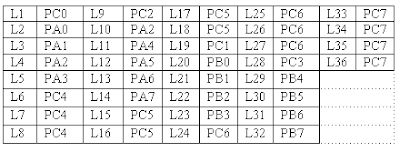
Traffic light controller interface module is designed to simulate the function of four way traffic light controller. Combinations of red, amber and green LED’s are provided to indicate Halt, Wait and Go signals for vehicles. Combination of red and green LED’s are provided for pedestrian crossing. 36 LED’s are arranged in the form of an intersection. A typical junction is represented on the PCB with comprehensive legend printing.
At the left corner of each road, a group of five LED’s (red, amber and 3 green) are arranged in the form of a T-section to control the traffic of that road. Each road is named North (N), South(S), East (E) and West (W). LED’s L1, L10, L19 & L28 (Red) are for the stop signal for the vehicles on the road N, S, W, & E respectively. L2, L11, L20 & L29 (Amber) indicates wait state for vehicles on the road N, S, W, & E respectively. L3, L4 & L5 (Green) are for left, strait and right turn for the vehicles on road S. similarly L12-L13-L14, L23-L22-L21 & L32-L31-L30 simulates same function for the roads E, N, W respectively. A total of 16 LED’s (2 Red & 2 Green at each road) are provided for pedestrian crossing. L7-L9.L16-L18, L25-L27 & L34-L36 (Green) when on allows pedestrians to cross and L6-L8, L15-L17, L24-L26 & L33-L35 (Red) when on alarms the pedestrians to wait.
To minimize the hardware pedestrian’s indicator LED’s (both red and green are connected to same port lines (PC4 to PC7) with red inverted. Red LED’s L10 & L28 are connected to port lines PC2 & PC3 while L1 & L19 are connected to lines PC0 & PC1 after inversion. All other LED’s (amber and green) are connected to port A & B.
WORKING:-
8255 is interfaced with 8086 in I/O mapped I/O and all ports are output ports. The basic operation of the interface is explained with the help of the enclosed program. The enclosed program assumes no entry of vehicles from North to West, from road East to South. At the beginning of the program all red LED’s are switch ON, and all other LED‘s are switched OFF. Amber LED is switched ON before switching over to proceed state from Halt state.
The sequence of traffic followed in the program is given below.
a) From road north to East
From road east to north
From road south to west
From road west to south
From road west to north
b) From road north to East
From road south to west
From road south to north
From road south to east
c) From road north to south
From road south to north
Pedestrian crossing at roads west & east
d) From road east to west
From road west to east
Pedestrian crossing at roads north & south
:: MASM 611 SOFTWARE
:: bit reversal and sorting programs
:: Find Square Root of a hexadecimal number in assembly language
:: common intreview questions on 8086
To develop Traffic light Control system using 8086
APPARATUS:-
Microprocessor trainer kit, Traffic light controller kit, power supply, data cable etc
THEORY:-
Traffic light controller interface module is designed to simulate the function of four way traffic light controller. Combinations of red, amber and green LED’s are provided to indicate Halt, Wait and Go signals for vehicles. Combination of red and green LED’s are provided for pedestrian crossing. 36 LED’s are arranged in the form of an intersection. A typical junction is represented on the PCB with comprehensive legend printing.
At the left corner of each road, a group of five LED’s (red, amber and 3 green) are arranged in the form of a T-section to control the traffic of that road. Each road is named North (N), South(S), East (E) and West (W). LED’s L1, L10, L19 & L28 (Red) are for the stop signal for the vehicles on the road N, S, W, & E respectively. L2, L11, L20 & L29 (Amber) indicates wait state for vehicles on the road N, S, W, & E respectively. L3, L4 & L5 (Green) are for left, strait and right turn for the vehicles on road S. similarly L12-L13-L14, L23-L22-L21 & L32-L31-L30 simulates same function for the roads E, N, W respectively. A total of 16 LED’s (2 Red & 2 Green at each road) are provided for pedestrian crossing. L7-L9.L16-L18, L25-L27 & L34-L36 (Green) when on allows pedestrians to cross and L6-L8, L15-L17, L24-L26 & L33-L35 (Red) when on alarms the pedestrians to wait.
To minimize the hardware pedestrian’s indicator LED’s (both red and green are connected to same port lines (PC4 to PC7) with red inverted. Red LED’s L10 & L28 are connected to port lines PC2 & PC3 while L1 & L19 are connected to lines PC0 & PC1 after inversion. All other LED’s (amber and green) are connected to port A & B.
WORKING:-
8255 is interfaced with 8086 in I/O mapped I/O and all ports are output ports. The basic operation of the interface is explained with the help of the enclosed program. The enclosed program assumes no entry of vehicles from North to West, from road East to South. At the beginning of the program all red LED’s are switch ON, and all other LED‘s are switched OFF. Amber LED is switched ON before switching over to proceed state from Halt state.
The sequence of traffic followed in the program is given below.
a) From road north to East
From road east to north
From road south to west
From road west to south
From road west to north
b) From road north to East
From road south to west
From road south to north
From road south to east
c) From road north to south
From road south to north
Pedestrian crossing at roads west & east
d) From road east to west
From road west to east
Pedestrian crossing at roads north & south

ASSEMBLY LANGUAGE PROGRAMS:-
MODEL SMALL
.STACK 100
.DATA
 CWR EQU 0FFC6 H
 PORTA EQU 0FFC0 H
 PORTB EQU 0FFC2 H
 PORTC EQU 0FFC4 H
 .CODE
 START:
 MOV AX,@DATA
 MOV DS,AX
 MOV AL,80H
 MOV DX,CWR
 OUT DX,AL
 MOV AL,F3H
 MOV DX,PORTC
 OUT DX,AL
 MOV AL,FFH
 MOV DX,PORTA
 OUT DX,AL
 MOV AL,FFH
 MOV DX,PORTB
 OUT DX,AL
 MOV CL,03H
 CALL DELAY
 TOP:
 MOV AL,EEH
 MOV DX,PORTA
 OUT DX,AL
 MOV AL,EEH
 MOV DX,PORTB
 OUT DX,AL
 MOV CL,02H
 CALL DELAY

 MOV AL,FCH
 MOV DX,PORTC
 OUT DX,AL
 MOV AL,7DH
 MOV DX,PORTA
 OUT DX,AL
 MOV AL,57H
 MOV DX,PORTB
 OUT DX,AL
 MOV CL,15H
 CALL DELAY

 MOV AL,E7H
 MOV DX,PORTB
 OUT DX,AL
 MOV AL,FDH
 MOV DX,PORTA
 OUT DX,AL
 MOV AL,EDH
 MOV DX,PORTA
 OUT DX,AL
 MOV CL,02H
 CALL DELAY

 MOV AL,F7H
 MOV DX,PORTB
 OUT DX,AL
 MOV AL,F0H
 MOV DX,PORTC
 OUT DX,AL
 MOV AL,F1H
 MOV DX,PORTA
 OUT DX,AL
 MOV CL,15H
 CALL DELAY

 MOV AL,FBH
 MOV DX,PORTA
 OUT DX,AL
 MOV AL,FBH
 MOV DX,PORTB
 OUT DX,AL
 MOV AL,50H
 MOV DX,PORTC
 OUT DX,AL
 MOV CL,15H
 CALL DELAY

 MOV AL,FEH
 MOV DX,PORTA
 OUT DX,AL
 MOV AL,FEH
 MOV DX,PORTB
 OUT DX,AL
 MOV CL,03H
 CALL DELAY

 MOV AL,FFH
 MOV DX,PORTA
 OUT DX,AL
 MOV AL,AFH
 MOV DX,PORTC
 OUT DX,AL
 MOV AL,EEH
 MOV DX,PORTA
 OUT DX,AL
 MOV AL,EEH
 MOV DX,PORTB
 OUT DX,AL
 MOV CL,02H
 CALL DELAY

 MOV AL,BFH
 MOV DX,PORTA
 OUT DX,AL
 MOV AL,BFH
 MOV DX,PORTB
 OUT DX,AL
 MOV CL,15H
 CALL DELAY
 JMP TOP

 DELAY:
 MOV BX,10H
 D1:
 MOV CX,0FFFFH
 D2:
 LOOP D2
 DEC BX
 JNZ D1
 INT 03H
END START


PROCEDURE:-
1.    Connect power supply 5V & GND to both microprocessor trainer kit & Traffic light controller interfacing kit.
2.    Connect data bus between microprocessor trainer kit & Traffic light controller interfacing kit.
3.    Enter the program to control Traffic light.
4.    Execute the program by typing GO E000:0B80 ENTER.
5.    Observe the LED’s on traffic light controller PCB.

You might be also interested in:
:: MASM 611 SOFTWARE
:: bit reversal and sorting programs
:: Find Square Root of a hexadecimal number in assembly language
:: common intreview questions on 8086
Jan 28, 2008
Temperature Control system using 8086
To develop Temperature Control system using 8086
Microprocessor trainer kit, Temperature controller kit, power supply, data cable etc
Temperature control system involved interfacing successive approximation ADC and typical method of measuring and controlling the temperature using microprocessor. ADC is among the most widely used devices for data acquisition. A digital computer uses binary values, but in physical world everything is analog, temperature, pressure, humidity, and velocity are few examples of physical quantities that we seal with every day.
Temperature measurement is of great importance in industry as most of the processes are temperature dependent. A number of devices and schemes have been used over the years, for the measurement of temperature. Typical sensors include devices like thermocouples, thermostats, RTD’s and semiconductor sensor.
This system uses semiconductor sensor AD590 to monitor the temperature of water bath. The AD590 is basically a PTAT (proportional to absolute temperature) current regulator. It generates a current O/P of 1µA/K above absolute zero temperature that is -2730C. Thus at 00C the current O/P will be 273µA and 250 if will be 298µA and 373mV at 1000. This O/p is buffered through an OPAMP having a gain of 10. To enable easy equivalence between the transducers O/P in volts and the measured temperature a calibration procedure needs to be done.
WORKING:-
8255 is interfaced with 8086 in I/O mapped I/O. port A (PA0-PA7) as input port is connect to data lines of ADC, PB0, PB1, PB2 lines of port B for channel selection, PC2 connected to Start of conversion (SOC) and PC3 to O/P enable. Channel 1 of ADC is used to input analog signal, Channel 0 of ADC for temperature controller.
ADC will give binary equivalent of the I/P voltage. Input will vary from 0 to 5V (0 to 100 degree C) and the ADC O/P varies from 00-FFH. So 5V/100 i.e. 5000mvs/100 gives 50mvs/0C. And the counts for indication of temperature are taken as 2.5 (256/100) per degree C.
AC supply to the external heating element is controlled through the onboard Relay, based on the set value. When the temperature of the heating element (which is sensed by AD590, AD590 output is analog which is converted to digital by ADC) is less than the set value (reference value) heating element will be switched ON and when temperature crosses the set temperature AC supply is turned OFF.
MODEL SMALL
.STACK 100
.DATA
  START:
       PORTA   EQU FFC0H                      ; PORTA address
       PORTB   EQU FFC2H                      ; PORTB address
       PORTC   EQU FFC4H                      ; PORTC address
       CTL         EQU FFC6H                      ; Control port address
       CTL_BYTE EQU 98H                      ; 8255 control reg.
       CLEAR_DISPLAY EQU F800:4BB1H
       DWAD    EQU F800:4BB1H
       DBDTA   EQU F800:4F1F
       DEC_TEMP DB 0
       SET_TEMP DB 0
       ADC_VAL  DB 0
       COUNT    DB 0
       PRE_TEMP DB 0
.CODE
 ADC TABLE:

   DB 00H,03H,05H,08H,0aH,0dH,0fH,11H,14H,16H


   DB 19H,1cH,1eH,21H,24H,27H,2aH,2cH,2eH,32H

   DB 34H,36H,39H,3cH,3fH,42H,45H,48H,4aH,4cH

   DB 4eH,50H,52H,54H,56H,58H,5bH,61H,64H,67H

   DB 6aH,6dH,70H,72H,74H,77H,7aH,7dH,7fH,82H

   DB a0H,a2H,a5H,a8H,aaH,aDH,afH,b0H,b3H,b6H

   DB b9H,bcH,bfH,c1H,c4H,c6H,c9H,ccH,cfH,d0H

   DB d2H,d5H,d7H,daH,dcH,dfH,e0H,e2H,e5H,e7H

   DB e9H,ebH,eeH,f1H,f4H,f6H,f9H,fcH,ffH

   START:
        MOV AL,CTL_BYTE                       ; 8255
        MOV DX,CTL                                ; PORTC (lower) as output
        OUT DX,AL                                 ; PORTA as input
        MOV AL,DEC_TEMP
        CALL DEC_HEX
        MOV SET_TEMP,AL
        MOV AL,DEC_TEMP
        MOV AH,00
        MOV SI,AX
        CALL FAR DWAD
        MOV DX,CTL
        MOV AL,02
        OUT DX,AL
        MOV AL,00
        OUT DX,AL
        MOV CX,70
    L0:
        LOOP L0
    BACK:
        MOV COUNT,0
        CALL ADC
        CALL DISP_TEMP
        CALL TEMP_CONTL
        JMP BACK
     DISP_TEMP:
        MOV AL,ADC_VAL
        MOV SI,OFFSET ADC_TABLE
     AGAIN:
        CMP AL,[SI]
        JC FOUND
        JE FOUND
        INC SI
        INC COUNT
        JMP AGAIN
     FOUND:
        MOV AL,COUNT
        CALL HEX_DEC
        MOV AH,0
        MOV SI,AX
        CALL FAR DBDTA
        RET
     TEMP_CONTL:
        MOV AL,COUNT
        CMP AL,SET_TEMP
        JC TURN_ON_RELAY
     RELAY_OFF:
        MOV DX,PORTB
        MOV AL,0FFH
        OUT DX,AL
        MOV DL,20H
     HERE1:
        MOV CX,FFFFH
     HERE:
        LOOP HERE
        DEC DL
        JNZ HERE1
        RET
     TURN_ON_RELAY:
        MOV DX,PORTB
        MOV AL,00H
        OUT DX,AL
     CONTINUE:
        MOV CX,FFFFH
     L22:
        LOOP L22
        RET
     ADC:
        MOV DX,CTL
        MOV AL,01
        OUT DX,AL
        MOV CX,70
      L10:
        LOOP L10
        MOV AL,00
        OUT DX,AL
      L1:
        MOV DX,PORTC
        IN AL,DX
        AND AL,80H
        CMP AL,80H
        JNZ L1
        MOV DX,PORTA
        IN AL,DX
        MOV ADC_VAL,AL
        RET
      HEX_DEC:
        MOV AH,00H
        MOV CL,0AH
        DIV CL
        MOV CL,04H
        ROL AL,CL
        AND AL,F0H
        OR AL,AH
        RET
      DEC_HEX:
        MOV BL,AL
        AND BL,0FH
        AND AL,F0H
        MOV CL,04
        ROR AL,CL
        MOV CL,0AH
        MUL CL
        ADD AL,BL
        RET
    END START
PROCEDURE:-
1. Connect power supply 5V & GND to both microprocessor trainer kit & temperature controller interfacing kit.
2. Connect data bus between microprocessor trainer kit & temperature controller interfacing kit.
3. Enter the program to read temperature of the water bath from ADC at 0000:4000.
4. Execute the program by typing GO 0000:4000 enter.
5. Enter the reference temperature value, when temperature of water bath exceeds reference value then power supply to water bath is switched OFF.
You might be also interested in:
:: Assembly Language Program to serve NMI
:: Interfacing Stepper Motor to 8086 using 8255
Subscribe to:
Posts (Atom)
